Texture Rotation
Material

Texture Rotation

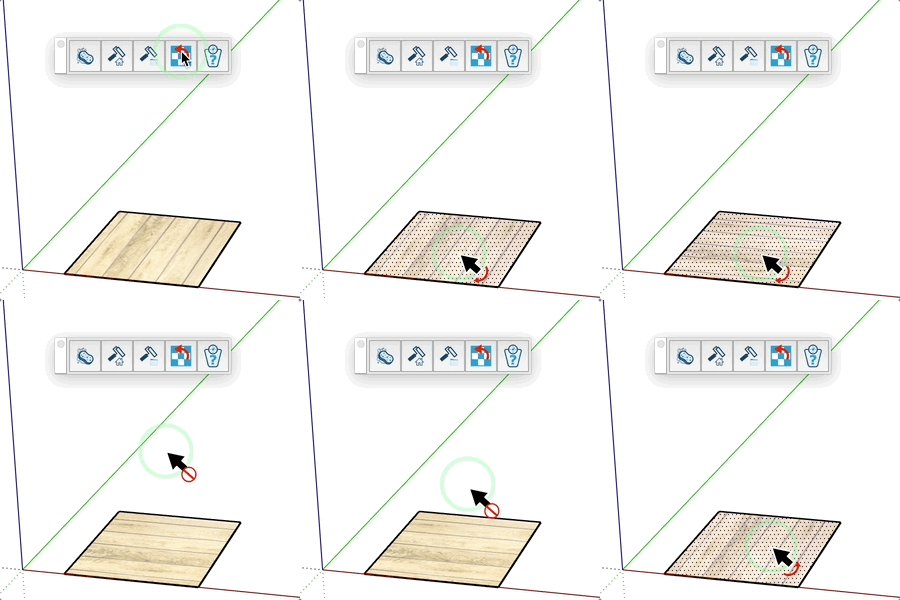
Rotate the texture 90°. Modif reverses direction.

Video demonstration

Demonstration

Texture Rotate Tool

Easily rotate face textures without altering their geometry.

How it Works

  1. Hover over a textured face
  2. The face is automatically selected
  3. Click to rotate the texture

Keys

  • Ctrl (or Cmd) = Change rotation direction (clockwise/counter-clockwise)
  • Esc = Cancel operation

Tips

  • Works equally well on front and back faces
  • The cursor changes to indicate rotation direction
  • Only faces with textures can be selected
  • Ideal for quickly adjusting texture orientation

Try this tool for free

AD Design Free Trial

Fill out this form to receive your free download link.

✓

Thank you for your request!

Your download link is ready. The download will start automatically.

Download Now