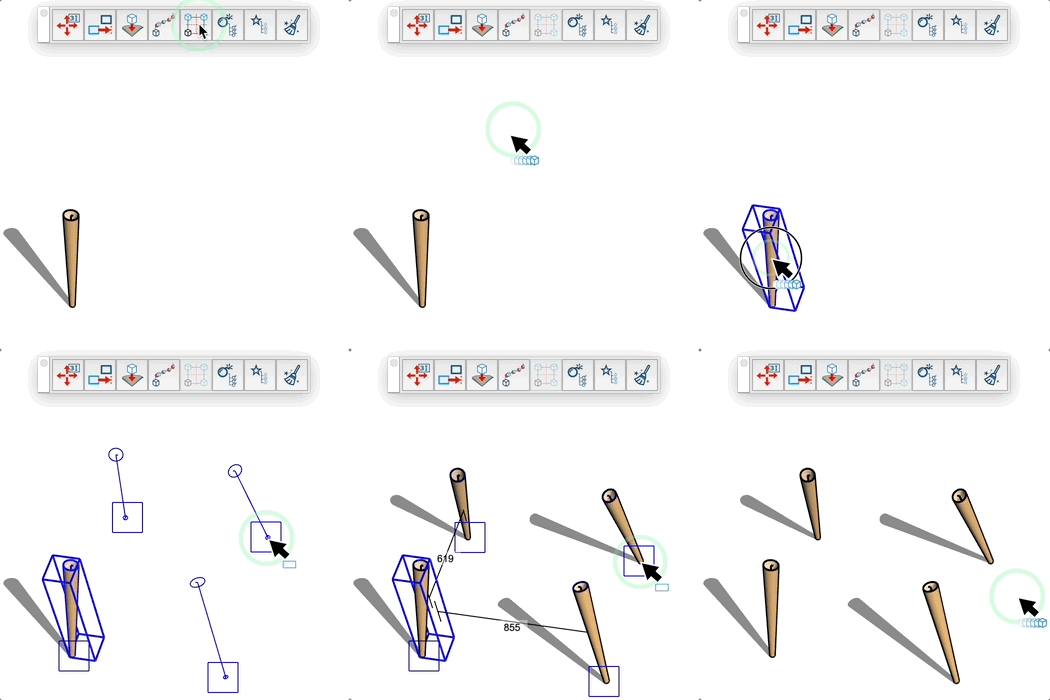
Symmetry Copies Tool
Quickly create symmetrical copies of a component or group along coordinate axes with automatic positioning.
How it works
- Activate the tool
- Select a group or component to duplicate
- Position the cursor to define the symmetry reference point
- Click to automatically create the symmetrical copies
Adjustable parameters
- Width distance: horizontal spacing between the original and its symmetrical copy
- Depth distance: vertical spacing between the original and its symmetrical copy
- Number of copies: 2 copies (symmetry on one axis) or 4 copies (symmetry on two axes)
- Symmetry type: automatically determined based on cursor position
Types of symmetry
- Simple symmetry (2 copies): when the cursor is aligned with only one axis (horizontal or
vertical)
- Double symmetry (4 copies): when the cursor is offset on both axes simultaneously
Tips
- You can enter precise values in the VCB using the format "width;depth" (e.g., 100mm;200mm)
- The minimum distance is automatically applied to avoid overlaps
- If you have already selected a group or component before activating the tool, it will be automatically used
- The number of copies automatically adapts based on your positioning
- The copies follow the coordinate axes of the current system
- The tool remembers the distances used to facilitate repetitive operations
- Keep the cursor close to the axes to get symmetry on a single axis