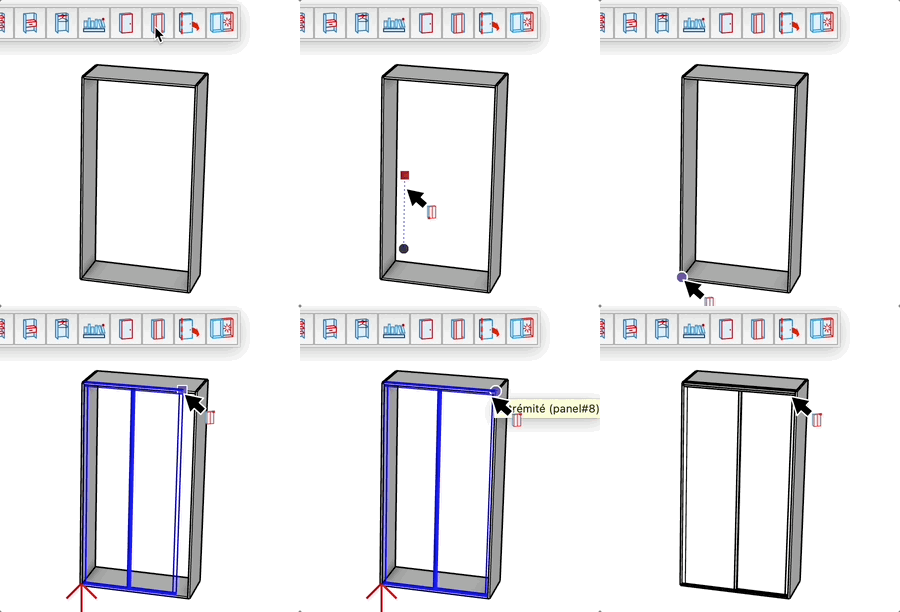
Dressing Door
Cabinetry

Dressing Door

Create a dressing door with adjustable width and height

Video demonstration

Demonstration

Dressing Door Tool

Create dressing or closet doors quickly in 2 clicks.

How it works

  1. Click to set the insertion point (bottom corner).
  2. Move the mouse to define width and height.
  3. Option (Mac), Ctrl (PC) = switch the depth direction of the door with the key
  4. Click to confirm the end point (opposite corner).

Dimension Control

After the first click, you can enter precise dimensions:

  • Type Width;Height (e.g., 80cm;200cm) and press Enter.

Features

  • Intuitive creation via rectangle.
  • Dynamic adjustment of width and height.
  • Uses the active material if available.

Try this tool for free

AD Design Free Trial

Fill out this form to receive your free download link.

Thank you for your request!

Your download link is ready. The download will start automatically.

Download Now