vertical follow me
Model

vertical follow me

Effectue une extrusion Follow Me le long d'un chemin vertical avec gestion intelligente de la connexion profil-chemin.
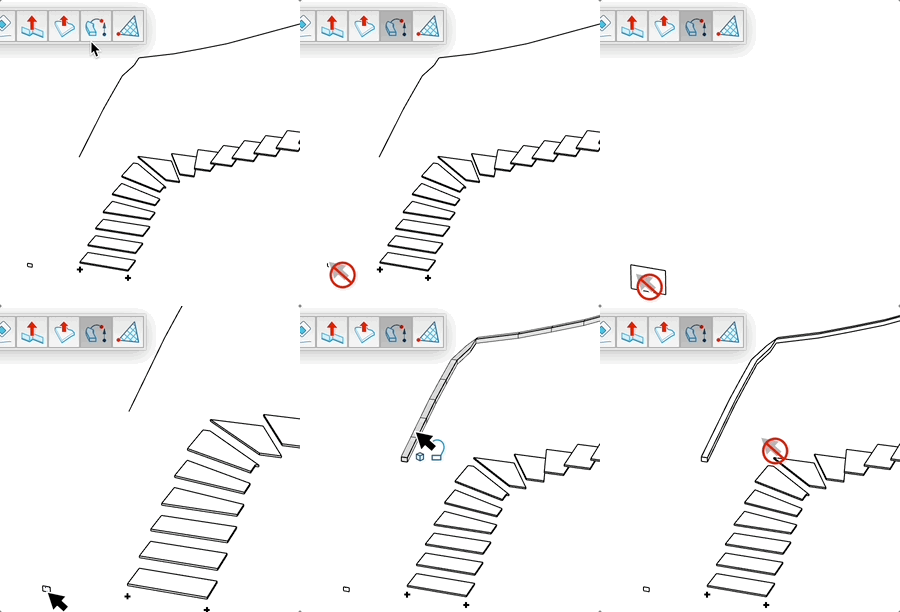
Video demonstration

Demonstration

Follow Me Vertically Tool

Performs a Follow Me extrusion along a vertical path with intelligent profile-path connection management.

How It Works

  1. Click on a face to define the extrusion profile
  2. Select a curve as the vertical path
  3. The connection between profile and path is automatically detected
  4. Click to validate and create the extrusion

Group Mode

  • Press the modifier key (Ctrl/Alt) to toggle group mode
  • In group mode: each extrusion is created in a separate group
  • In normal mode: the extrusion is created directly in the active context
  • The cursor changes to indicate the active mode

Advantages

  • Automatic detection of the connection point between profile and path
  • Automatic path reversal if needed for correct extrusion
  • Automatic profile orientation according to face normal
  • Automatic edge smoothing for a fluid result
  • Real-time extrusion preview

Try this tool for free

AD Design Free Trial

Fill out this form to receive your free download link.

Thank you for your request!

Your download link is ready. The download will start automatically.

Download Now