Text Move Tool
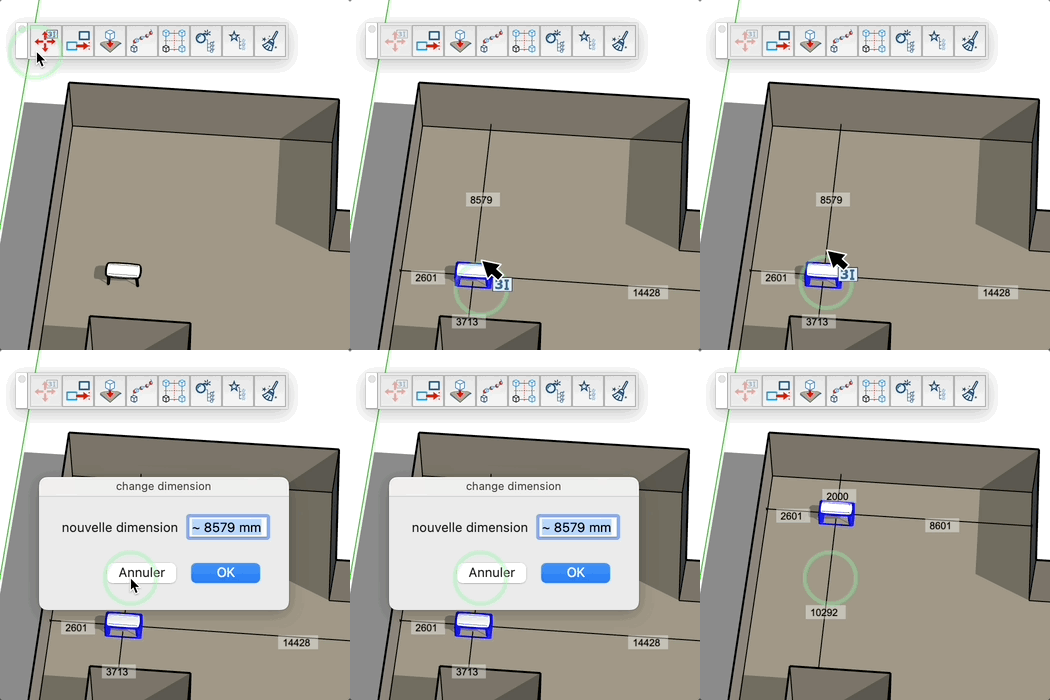
Quickly move components and groups by directly modifying their dimensions displayed on screen.
How it works
- Activate the tool
- Select a component or group in your model
- Move your cursor near a displayed dimension
- Click on the dimension you want to modify
- Enter the new value in the dialog box
- Confirm to automatically move the object according to the new dimension
- Move your cursor near a rotation arrow
- Click on the rotation arrow to rotate the component by 90°
- Double-click on the rotation arrow to rotate the component by 180°
- Move your cursor near a direction arrow
- Click on the direction arrow to move the component in the direction of the arrow
- Double-click on the direction arrow to move the component to the next obstacle
Adjustable parameters
- New dimension: the value you want to apply
- Movement direction: automatically calculated according to the dimension vector
- Movement distance: calculated as the difference between old and new value
Tips
- The cursor changes appearance when you are near a modifiable dimension
- Dimensions must be visible on screen to be modified
- The tool works only with selected components and groups
- The movement automatically follows the direction of the dimension vector
- You can enter values in different units (mm, cm, m, inches, feet)
- The operation can be undone with Ctrl+Z
- Select another object by clicking on it if no dimension is near the cursor