Stair Tool
Quickly create custom stairs with precise dimension control.
How it Works
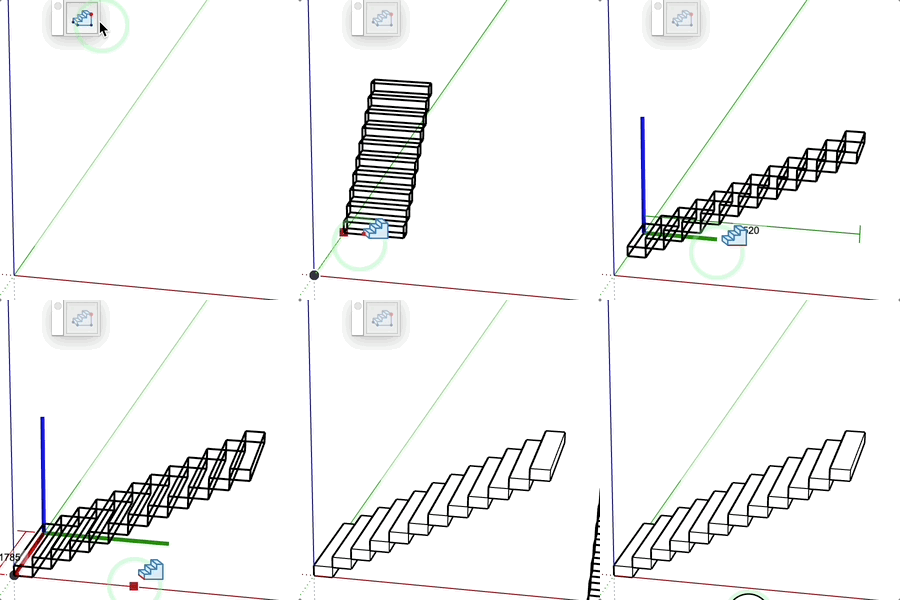
- Define the insertion point (start of the staircase)
- Define the height (blue line)
- the depth (green line)
- Define the width (red line)
- Select the number of steps (if multiple options)
Parameters
- Height: defines the total elevation of the staircase
- Depth: defines the length of the staircase
- Width: defines the width of the steps
- Number of steps: the tool offers optimal options to respect the Blondel coefficient
Tips
- Enter a precise value at each step
- A preview displays the staircase in real time
- Dimensions are displayed during creation
- Step number options comply with ergonomic standards
- If the mouse is still for 2 seconds, a tooltip indicates the value and step compliance
- If the staircase is red, the Blondel coefficient is not met
- Step quantities with a green check are values that meet the Blondel coefficient