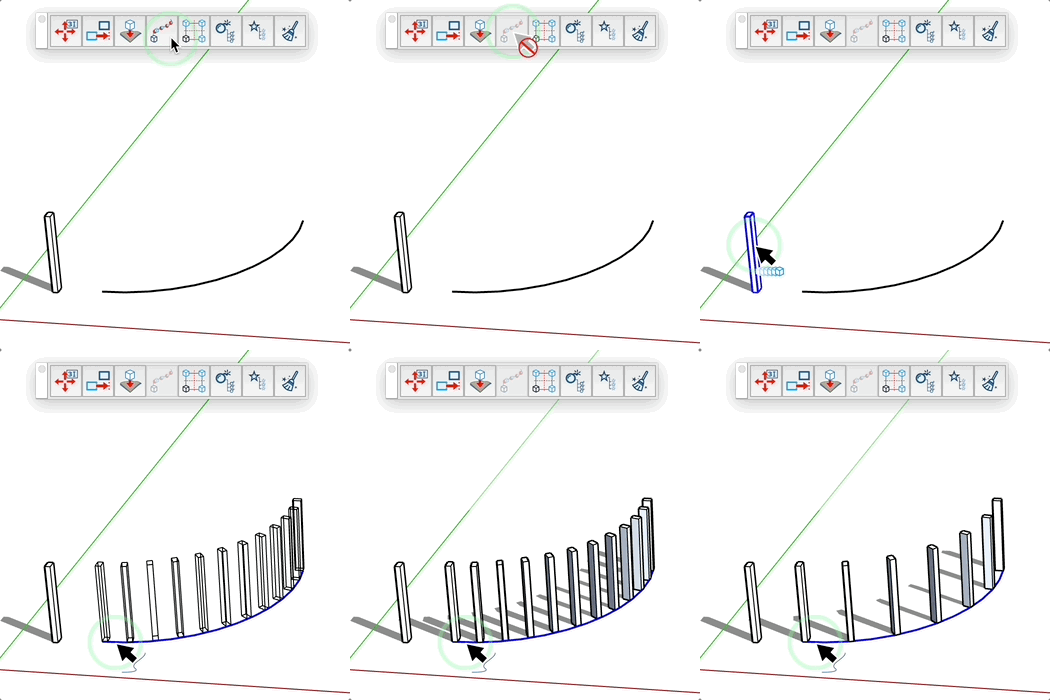
Copies Along Curve Tool
Quickly create multiple copies of a component or group along a curve with customizable number of instances.
How it works
- Activate the tool
- Select a component or group to copy
- Select a curve along which to distribute the copies
- Adjust the number of copies if needed
- Click to create copies along the curve
Adjustable parameters
- Number of copies: defines how many instances will be created along the curve
- Source Component/Group: the object that will be duplicated
- Reference curve: the path along which copies will be distributed
Tips
- You can enter a precise value for the number of copies in the VCB
- Use the + and - keys to quickly increase or decrease the number of copies
- The tool remembers the number of copies previously used
- If you've already selected a group or component before activating the tool, it will be automatically used
- Copies are evenly distributed along the selected curve
- Press the Ctrl key (Windows) or Option key (Mac) to change the starting point of the copies: this option
offsets the starting point by half the distance, changing how copies are placed along the curve
- Works with all curve types: arcs, circles, Bezier curves, etc.